Operator Rounds
This article focuses on operator round mechanics. For the complete Asset Condition Monitoring workflow (how rounds, routes, readings, and trending work together), see Asset Condition Monitoring.
Purpose
Operator Rounds are the centerpiece of Phase 1. They provide a structured way for operators to walk the plant floor, inspect assets at defined route stops, and capture standardized readings alongside observations, photos, and notes — all while working offline if needed.
What is an Operator Round?
An operator round is a predefined route through the plant that guides an operator to specific route stops. Each route stop is tied to an asset or functional location and defines which readings to capture and checks to perform.
Key Concepts
- Operator Round: A specific execution of a route by an operator at a point in time
- Route: The predefined sequence of route stops that operators follow
- Route Stop: A stop on the route where the operator inspects an asset or location
- Asset Readings: Structured measurements (counters, temperature, pressure, vibration) captured against asset attributes
- Observations: Free-form notes, pass/fail checks, photos, and comments recorded at each route stop

Operator Routes
This section explains how Operator Routes and Rounds describe how operators move through the physical plant, using Blueprint Paper Mill as the reference site.
Blueprint Paper Mill Units
Blueprint Paper Mill is a fictitious mid-sized pulp and paper production facility that serves as the reference implementation for all examples. The mill consists of four main production units:
| Unit | Name | Description |
|---|---|---|
| Unit A | Pulping | Converting raw wood chips into pulp through continuous cooking |
| Unit B | Screening & Cleaning | Removing contaminants and preparing clean pulp |
| Unit C | Paper Machine Line | Forming, pressing, and drying paper from pulp |
| Unit D | Utilities | Providing steam, compressed air, cooling water, and electrical power |
Operator Routes and Rounds describe how operators physically move through these units to perform inspections and capture data.
Route (Template)
A Route is a predefined sequence of stops that an operator follows during an inspection. Think of it as a template or blueprint for how to walk the plant.
A Route contains:
- Route Stops – The individual stops along the route
- Order of Stops – The sequence in which stops should be visited
- Optional Linked Assets – Equipment or locations to inspect at each stop
- Optional Instructions – Guidance for what to check or measure
Important: A Route does not contain readings or data. It is purely a template that defines where to go and what to look for. The actual data capture happens during a Round.

Figure 1: A Route defines the path through the plant but contains no captured data
Route Stop
A Route Stop is a single stop on the route where the operator inspects a specific location or asset. Each stop may include:
- Asset Readings – Structured measurement values (temperature, pressure, vibration, etc.)
- Observations – Notes, pass/fail checks, photos, and comments
- Work Instructions – Contextual guidance including safety warnings, measurement procedures, and troubleshooting steps
Route Stops define where readings are taken and what to measure, but they do not contain the readings themselves. The actual values are captured during a Round execution.
Work Instructions provide operators with contextual guidance during rounds—safety warnings, measurement procedures, and troubleshooting steps—directly within the mobile app. See Work Instructions for details.
Round (Execution Instance)
A Round is a specific execution of a Route by an operator at a point in time. While the Route is a template, the Round is the actual work performed.
A Round contains:
- Operator – Who performed the round
- Timestamp or Shift – When the round was executed
- The Route Used – Which template was followed
- Status – In progress, completed, cancelled, etc.
- Route Stop Results – The actual readings and observations captured at each stop
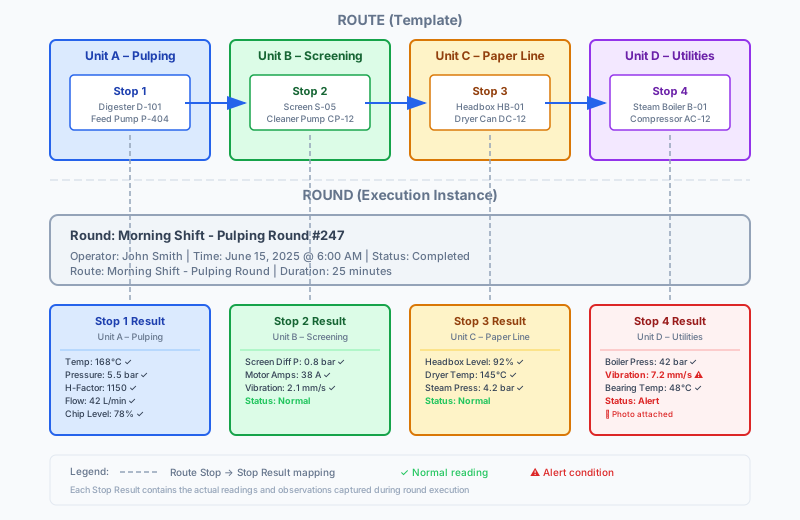
Figure 2: A Round is an execution of a Route, producing Stop Results with actual data
Route Stop Results
For each Route Stop in the template, a Round creates a corresponding Route Stop Result. These results contain the actual recorded values:
- Readings – Measured values for each attribute (temperature, pressure, vibration, etc.)
- Observations – Notes, comments, and findings from the inspection
- Photos – Images captured during the inspection
- Timestamps – When each reading or observation was recorded
- Status – Normal, warning, or alert based on thresholds
| Concept | Purpose |
|---|---|
| Route | Defines the inspection path (template) |
| Route Stop | Defines what happens at each stop |
| Round | One execution of the Route by an operator |
| Route Stop Result | What actually happened at each stop during execution |
Why This Model Matters
This separation between Routes (templates) and Rounds (executions) provides significant operational benefits:
Consistency Across Shifts Every operator follows the same route stops, ensuring nothing is missed regardless of who performs the round.
Traceability Every reading is linked to a specific operator, timestamp, and location. You always know who captured what and when.
Trend Analysis Because readings are captured consistently at the same route stops, you can track changes over time and identify patterns before problems occur.
Reliability Improvements Historical data from completed rounds helps identify recurring issues, predict failures, and optimize maintenance schedules.
Safety and Compliance Structured rounds ensure required safety checks are performed. The audit trail demonstrates compliance with regulations and procedures.
Operator Handovers Incoming operators can see exactly what the previous shift observed, including any flagged issues that need attention.
Daily Production Monitoring Supervisors can monitor conditions across all units (A–D) from a single dashboard, with alerts for abnormal readings.
Phase 1 Vision
Phase 1 focuses on capturing reliable asset condition data from the field. Each round stores:
- Who: The operator who performed the round
- When: Timestamp for the round and each route stop
- Where: Which assets and functional locations were inspected
- What: Structured readings tied to asset attributes (e.g., "Pump discharge pressure: 45 bar")
- How: Pass/fail checks, observations, photos, and notes
All of this data is stored locally first and syncs in the background when connectivity is available, ensuring operators can complete rounds even in areas with poor or no network coverage.
Structured Asset Readings
Route stops now define which specific attributes to capture, creating a structured checklist. When configuring a route, administrators select which attributes should be captured at each stop.
See Asset Readings for details on how readings are captured and stored.
At each route stop, operators record readings for specific asset attributes:
- Counters: Running hours, production counts, cycle counts
- Temperature: Bearing temps, fluid temps, ambient temps
- Pressure: Discharge pressure, suction pressure, differential pressure
- Vibration: Vibration readings at measurement points
- Other Measurements: Flow rate, level, voltage, current, etc.
Each reading is:
- Tied to a specific asset attribute (defined by the asset's type)
- Timestamped with when it was captured
- Linked to the operator who recorded it
- Stored as both the "last known value" for that attribute and in historical records for trending
See Asset Readings & Route Stops for more detail on the reading model.
Observations & Photos
Beyond structured readings, operators can:
- Add free-form text observations about unusual conditions
- Take photos of issues or equipment state
- Record pass/fail checks for visual inspections
- Add general notes and comments
These observations supplement the structured data and provide context that helps supervisors and engineers triage issues.
Attachments
Operators can attach files (photos, documents, text files) to individual readings during rounds. This feature supports documenting equipment conditions with visual evidence.
Supported File Types
- Photos: JPEG, PNG, HEIC - Equipment condition, gauge readings, defects
- Documents: PDF, text files - Inspection reports, calibration certificates
- Any file type: Up to configured size limit
How Attachments Work
- Capture: Operator adds attachment via camera (mobile) or file picker (web/mobile)
- Local Storage: File stored locally with reading data (offline-first)
- Sync: When connectivity returns, file uploads to server storage
- Server Storage: Pluggable storage providers:
- Local: Files stored in
wwwroot/uploads/(development) - Azure Blob: Azure Blob Storage with SAS URLs (production)
- Local: Files stored in
Mobile Photo Capture (iOS & Android)
On mobile devices, operators can:
- Take Photo: Launch camera directly from reading form
- Choose from Gallery: Select existing photos from device
- Add Caption: Optional description for each attachment
- View/Delete: Manage attachments before completing stop
Photos are compressed and stored locally, then uploaded during background sync.
Web Attachments
On the web interface:
- Upload Files: Drag-and-drop or file picker for any file type
- View Attachments: Thumbnails for images, file icons for documents
- Download: Direct download links for all attachments
- Delete: Remove attachments from readings
See Asset Condition Monitoring for the complete workflow.
Example: Daily Digester Round at Blueprint Paper Mill
To illustrate how operator rounds work in practice, consider the Morning Shift - Pulping Round at Blueprint Paper Mill, a mid-sized pulp and paper production facility.
Route: Morning Shift - Pulping Round
Purpose: Verify critical pulping equipment is operating normally at the start of the morning shift
Frequency: Once daily, 6:00 AM
Route Stops:
-
Digester D-101 (Unit A – Pulping, basement level)
- Readings:
- Cooking Temperature (°C) – target: 165–172
- Digester Pressure (bar) – target: 5.2–5.8
- H-Factor – target: 1100–1200
- White Liquor Flow (L/min) – target: 38–45
- Chip Level (%) – target: 70–85
- Checks: Unusual noise or odor?
- Notes: Free-text observations
- Photo: Optional equipment photo
- Connectivity: Poor (basement location)
- Readings:
-
Feed Pump P-404 (Unit A – Pulping, pump room)
- Readings:
- Discharge Pressure (bar) – target: 11–13
- Motor Amperage (A) – target: 45–52
- Bearing Vibration (mm/s) – alert if >6.0
- Seal Temperature (°C) – target: <50
- Checks: Visible leaks?
- Photo: Required if leaks detected
- Connectivity: Poor
- Readings:
-
Black Liquor Tank BL-02 (Unit A – Pulping, ground level)
- Readings:
- Tank Level (%) – target: 40–80
- Liquor Temperature (°C) – target: 75–85
- Photo: Optional level gauge photo
- Connectivity: Good
- Readings:
Example Round Execution
On June 15, 2025 at 6:00 AM, operator John Smith begins the round:
-
6:05 AM – At Digester D-101 (offline, no cellular signal)
- Records: Temp 168°C ✅, Pressure 5.5 bar ✅, H-Factor 1150 ✅, Flow 42 L/min ✅, Chip Level 78% ✅
- All readings normal, no observations needed
- Data stored locally on device
-
6:15 AM – At Feed Pump P-404 (offline)
- Records: Discharge Pressure 12.5 bar ✅, Amperage 48 A ✅, Vibration 7.2 mm/s ⚠️, Seal Temp 42°C ✅
- Vibration above 6.0 mm/s threshold → app prompts for notes
- Operator adds: "Audible knocking sound from drive end bearing. Pump still operating but needs attention."
- Captures photo of pump bearing
- Observation automatically created
- Data stored locally on device
-
6:23 AM – At Black Liquor Tank BL-02 (online, good signal)
- Records: Tank Level 65% ✅, Temperature 82°C ✅
- All normal, no observations
- Data syncs to server immediately
-
6:25 AM – Returns to control room (online)
- All locally stored data from Digester D-101 and Feed Pump P-404 automatically syncs
- Supervisor sees completed round with 1 flagged observation (P-404 high vibration)
- Round duration: 25 minutes
Outcome
- Structured data captured: 11 readings across 3 assets, all timestamped and linked to operator
- Observation created: High vibration on Feed Pump P-404 flagged for maintenance review
- Offline operation: 2 of 3 route stops completed without connectivity
- Automatic sync: Data uploaded when operator returned to control room
- Actionable insight: Supervisor schedules bearing inspection for day shift
This example demonstrates how operator rounds provide consistent, structured data capture even in challenging connectivity environments, while automatically flagging abnormal conditions for follow-up.
For a hands-on walkthrough of operator rounds at Blueprint Paper Mill, see the Blueprint Paper Mill Tutorial.
Offline-First Design
Operator rounds are designed to work without connectivity:
- Round templates and asset data are synced to the mobile device in advance
- Operators complete rounds entirely offline if needed
- All readings, observations, and photos are stored locally
- Background sync pushes data to the server when connectivity returns
- No data is lost if the operator moves in and out of coverage
This is critical for industrial environments where Wi-Fi coverage is spotty or non-existent in parts of the plant.
Data Model (Phase 1 Vision)
The core entities supporting operator rounds:
- Operator Round: A specific execution of a route by an operator
- Route: Defines the sequence of route stops that operators follow
- Route Stop: Links a route to an asset/location and specifies which attributes to measure
- Route Stop Reading: The actual measurement values captured at a route stop
- Asset Attribute Value: Stores the reading tied to a specific asset attribute
- Observation: Free-form text, photos, and comments captured during the round
How It Works
- Setup: Define routes with route stops for each asset to inspect
- Schedule: Assign routes to operators (daily, weekly, per shift, etc.)
- Execute: Operator opens the round on mobile, walks the route, captures readings at each route stop
- Record: Structured readings are stored against asset attributes; photos and notes are attached to route stops
- Sync: When connectivity is available, the round syncs to the server
- Review: Supervisors and engineers review completed rounds, check for abnormal readings, and follow up on observations
Relationship to Other Features
- Assets & Asset Types: Rounds inspect assets; the asset type determines which readings are required
- Asset Attributes: Readings are recorded against specific attributes defined for the asset type
- Functional Locations: Route stops can be tied to locations in the plant hierarchy
- Work Instructions: Contextual guidance (safety warnings, measurement procedures, troubleshooting steps) appears during rounds. See Work Instructions.
- Work Items: Abnormal readings captured during rounds can be linked to work items for follow-up. Create a work item directly from a reading or link existing work items. See Work Items - Linked Readings.
- Phase 2 (Future): Abnormal readings and observations can be flagged as alerts and triaged
- Phase 3 (Future): AI agents can query observations and readings via MCP server to provide intelligent insights
CRUD & Management
- Create/Edit Routes: Define the route, add route stops, specify which asset attributes to measure
- Assign Rounds: Schedule routes for specific operators or shifts
- Execute Rounds: Mobile interface guides operators through route stops with streamlined data entry
- Review Completed Rounds: Web interface shows round history, readings, and observations
What's Next
Phase 1 establishes the foundation for capturing asset condition data. Phase 2 will build on this model to add:
- Automated alerts when readings exceed thresholds
- Observation triage workflows
- Supervisor dashboards for abnormal conditions
See the Product Roadmap for the full vision.